
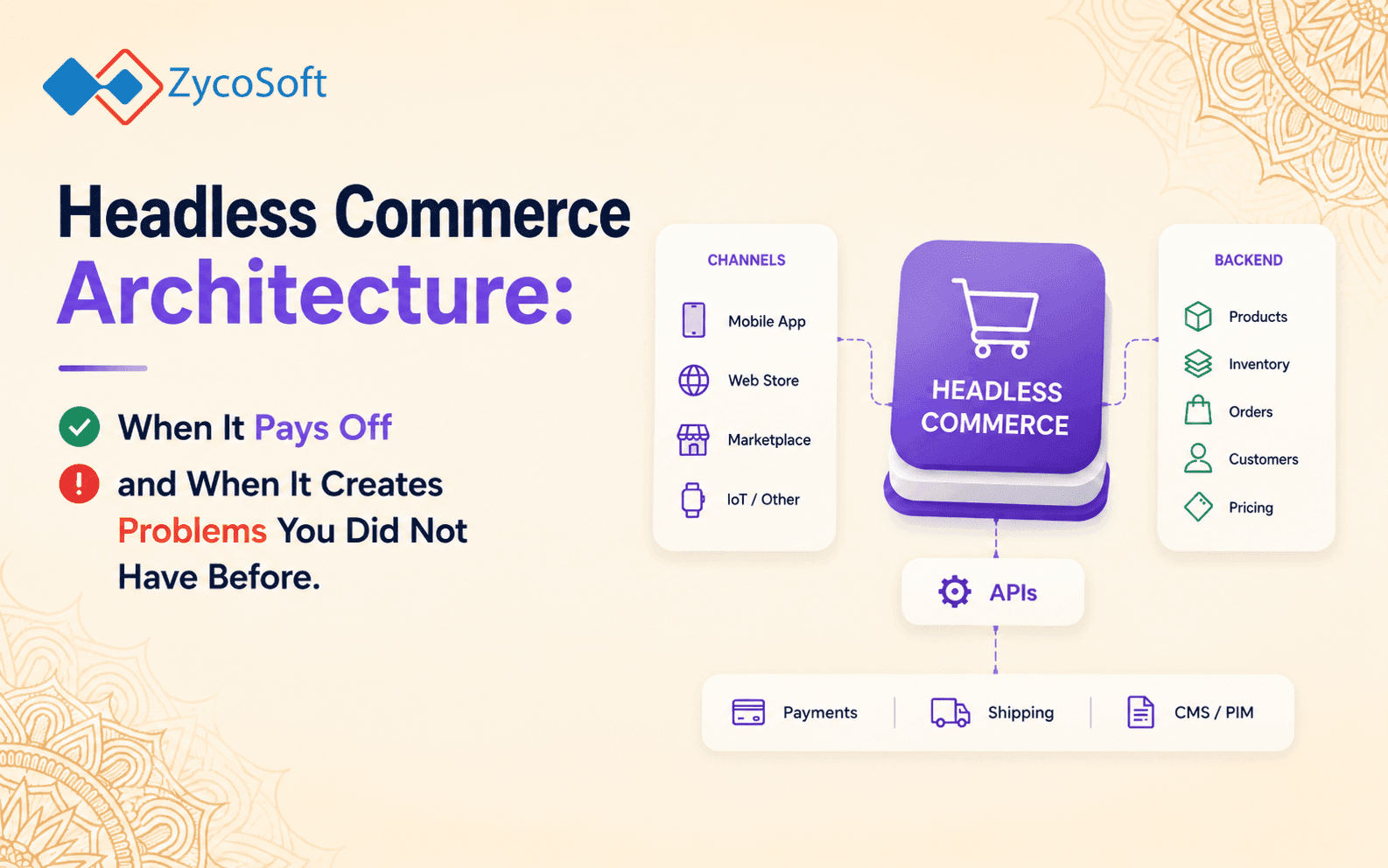
Headless Commerce Architecture: When It Pays Off and When It Creates Problems You Did Not Have Before.
The decision to go headless is almost always driven by a genuine frustration with platform constraints, but it is made before the full cost of ownership is understood. Headless commerce architecture moves you from a coupled platform (where the frontend and backend are one system) to a distributed architecture (where a standalone frontend application talks to commerce services via API). That trade is real. You gain frontend freedom and the ability to serve multiple surfaces from a single backend. You lose platform-managed rendering, built-in checkout flows, native plugin ecosystems, and the engineering safety net that Shopify or WooCommerce provides by default.
This post is a practitioner decision framework, not a product pitch for headless. It covers the architecture in enough depth to make the decision clearly, including the signals that justify going headless and the ones that suggest you are about to create significant complexity for a marginal gain.
What Headless Commerce Architecture Actually Means at the System Level?
In a traditional Shopify or WooCommerce setup, the platform owns the full request lifecycle. A user visits a product page, the platform resolves the URL, renders the template with product data, and returns HTML. The frontend and backend are tightly coupled through the theme layer.
In a headless architecture, those concerns are separated. The backend commerce engine (Shopify, a custom API, or a platform like Medusa or Commerce Layer) exposes product data, cart state, and checkout flows via REST or GraphQL APIs. The frontend is a standalone application, typically built on Next.js or Next, that consumes those APIs and handles its own rendering strategy.
A minimal headless commerce stack looks like this:
- Commerce backend: Shopify Storefront API, Medusa, or a custom service handling products, inventory, orders, and pricing .
- Headless CMS: Concertful, Sanity, or Storybook managing editorial content, landing pages, and campaign assets independently of the commerce layer .
- Frontend application: Next.js with hybrid rendering (SSG for catalogue, SSR for cart-aware and personalised pages) .
- CDN and edge layer: Vercel, Cloudflare, or AWS CloudFront handling caching, edge routing, and cache invalidation on product or content updates .
- Payment and checkout: Stripe, Mollie, or Razorpay integrated directly into the checkout flow, with your team owning the entire checkout UI and state management .
Each of those components is now an engineering responsibility. The platform is no longer the fall back owner for any of them.
The Real Architectural Trade-Offs: API Surface Area, Rendering, and Caching .
The three areas where headless commerce creates the most engineering overhead are API surface area management, frontend rendering strategy, and CDN cache invalidation. Getting any of these wrong is where performance regressions and operational problems originate in most headless builds.
API surface area :
When your storefront talks to a commerce backend via API, every piece of data the frontend needs must be explicitly fetched. On a Shopify theme, product metafields, variant data, and inventory status are available in the Liquid template context automatically. In a headless setup, you build and maintain the data-fetching layer yourself. Over-fetching causes performance problems. Under-fetching causes missing data bugs at runtime. Managing this cleanly with a typed GraphQL schema and a well-structured data layer (Apollo Client or React Query with proper stale-while-revalidate configuration) is non-trivial work.
Rendering strategy :
You choose your rendering model in headless commerce. Static site generation (SSG) pre-builds product catalogue pages at deploy time and serves them instantly from the CDN. Server-side rendering (SSR) generates pages per request and is needed for personalised content, cart state, or logged-in user data. Client-side rendering (CSR) handles interactive components after the initial page load. A production headless storefront uses all three, and the decision of which pages get which rendering mode directly determines your Core Web Vitals scores and your server bill. A common failure mode is defaulting every page to SSR because it is the simplest mental model, then being surprised by cold-start latency and infrastructure cost at scale.
Cache invalidation :
In a platform like Shopify, content updates propagate automatically. In a headless setup, when a product price changes or a CMS editor publishes a new landing page, you are responsible for invalidating the CDN cache for the affected routes. This requires webhook listeners on your commerce backend and CMS, logic to map changed entities to affected URL paths, and API calls to your CDN provider to purge or tag-invalidate those paths. It is solvable, but it is operational overhead that does not exist in a coupled platform setup.
Total Cost of Ownership: The Comparison Most Vendors Do Not Show You
A well-configured Shopify store at Shopify Plus pricing runs approximately £1,800 to £2,000 per month in platform fees, inclusive of hosting, SSL, checkout, fraud analysis, and basic analytics. A WooCommerce store has lower licensing costs but carries its own hosting, security, and plugin maintenance overhead, typically £200 to £600 per month depending on scale and managed hosting tier.
A headless commerce setup distributes those costs differently across more line items:
- CMS licensing (Contentful, Sanity, or Storyblok): £300 to £1,500 per month depending on usage tier and seats .
- Frontend hosting and CDN (Vercel, Netlify, or AWS): £200 to £800 per month at meaningful traffic volumes .
- Commerce backend licensing or infrastructure if using a custom or open-source engine .
- Engineering time to own the storefront, CDN configuration, cache invalidation, and checkout integration .
- Ongoing maintenance across every decoupled service, including dependency updates and security patching .
The engineering cost is where the comparison tips sharply. A headless storefront build typically adds three to six months of delivery time and requires at minimum one experienced frontend engineer who understands server-side rendering trade-offs, CDN configuration, and commerce API integration. For most businesses under £5 million in annual revenue, that investment does not return proportionate gains in customer experience or conversion rate.
If you are evaluating payment integration across markets as part of this decision, the Stripe vs Mollie vs Razorpay payment gateway architecture comparison covers what your checkout ownership model means for gateway selection in UK, EU, and US markets.
Business Signals That Justify Going Headless :
Headless commerce architecture earns its cost when specific technical or business constraints make a coupled platform genuinely insufficient. These are the signals that actually justify the investment:
- Multiple frontend surfaces from one backend. You are building a web store, a native mobile app, and a digital kiosk or in-store screen, all consuming the same product catalogue, pricing, and inventory. A headless API backend is the right architectural answer here. A coupled platform is not designed for this.
- Content experience complexity that requires a dedicated CMS. You have editorial teams managing thousands of pages of campaign content, localised for multiple markets, with non-trivial content modelling requirements. A headless CMS owned separately from the commerce layer is the correct tool. If your content needs are primarily product descriptions and category pages, this signal does not apply.
- Strict performance requirements across markets with edge rendering. You need sub-150ms TTFB globally with personalised content, and you have the team to configure edge computing correctly. This is achievable with headless and edge rendering but requires expertise to deliver reliably.
- Custom checkout flows that Shopify Plus or WooCommerce cannot accommodate. B2B purchasing with quote workflows, complex subscription logic, or market-specific compliance requirements that the platform checkout cannot handle cleanly.
- Engineering team with demonstrated frontend architecture capability. You have senior engineers who have shipped SSR/SSG applications at scale and understand CDN configuration. Without this, going headless will produce a slower, more fragile storefront than the platform you replaced.
Business Signals That Suggest You Should Stay on Platform :
The case against going headless is usually stronger than it looks at the point the decision is being made. Shopify and WooCommerce have both extended their customisation capability substantially. Shopify's theme customisation through the Online Store 2.0 architecture, metafields, and metaobjects covers the majority of content and layout requirements that previously required headless.
Stay on a coupled platform when:
- Your annual revenue is below £2 million. The engineering investment cannot be justified by conversion upside at that scale.
- Your team does not currently include engineers with production experience building SSR applications with proper caching strategy.
- The primary driver is "we want more design flexibility." This is almost always solvable with platform tooling and a competent frontend developer, without decoupling the architecture.
- You are launching or in early growth. Speed to market and iteration velocity on a coupled platform will outperform a headless build at this stage every time.
- You have a single sales channel (web only) and no plans for native mobile or physical retail in the next 12 to 18 months.
For teams still deciding between Shopify and WooCommerce as a starting point before considering headless, the Shopify vs WooCommerce honest comparison covers that earlier decision in detail.
A Practical Decision Framework: Five Questions Before You Commit .
Before scoping a headless build, answer these five questions honestly. If you cannot answer yes to at least three, the architecture is not justified by your current requirements.
- Do you have more than one frontend surface (web, mobile app, kiosk, or third-party channel) that needs to consume the same commerce data simultaneously?
- Is your content management requirement complex enough that a dedicated headless CMS is already on your roadmap regardless of the commerce decision?
- Does your engineering team include at least one senior engineer with production experience delivering SSR/SSG applications and CDN configuration at scale?
- Have you calculated total cost of ownership including storefront build time, CMS licensing, CDN infrastructure, and ongoing maintenance, and does it remain justified against your projected revenue?
- Do you have specific checkout, pricing, or compliance requirements that Shopify Plus customisation (including checkout extensibility) or WooCommerce with custom plugins cannot meet?
This maps to the same scoping discipline we apply to any complex platform decision. The right architecture is the one that fits your team's capability, your business stage, and your actual technical constraints. Complexity that does not serve those constraints will slow you down, not differentiate you.
How ZycoSoft Approaches Headless Commerce Architecture Decisions .
Our eCommerce Development practice has delivered across the full spectrum: high-volume Shopify Plus stores, WooCommerce builds with custom checkout flows, and genuinely headless architectures for clients with multi-surface and multi-market requirements. We do not default to one approach. The first conversation is always about whether the architecture matches the business.
We scope projects to avoid the two failure modes that recur most often in this space. The first is over-engineering an MVP into a headless build because it felt more technically interesting, then spending six months on infrastructure instead of on customer acquisition. The second is under-architecting a growing store on a coupled platform until the technical debt forces a painful migration at the worst possible moment in the business cycle.
Our team has direct experience with Shopify Storefront API and Hydrogen, WooCommerce with headless decoupling, and custom commerce backends integrated with Stripe, Mollie, and Razorpay across UK, EU, and US markets. We also carry GDPR-compliant architecture capability, which matters when your headless stack spans multiple services handling customer and order data across jurisdictions. Building privacy controls into the data layer of a distributed commerce system from the start is substantially cheaper than retrofitting them. Our post on GDPR-compliant software architecture covers that engineering discipline in detail.
If you are evaluating a platform migration or a greenfield commerce build and want a technical assessment of whether headless is actually warranted, we will give you a direct answer based on your requirements, not on which architecture is more billable to deliver.
Talk to our eCommerce engineering team about your architecture decision.
Frequently Asked Questions
Headless commerce architecture separates the frontend presentation layer from the backend commerce engine. Instead of a theme rendering directly from the platform, your storefront is a standalone application (typically React or Next.js) that pulls product, cart, and checkout data via API. Shopify and WooCommerce couple the two by default, which reduces complexity but constrains what the frontend can do independently.
Headless makes sense when you need a single commerce backend serving multiple frontend surfaces simultaneously, such as a web store, native mobile app, and in-store kiosk. It also makes sense when your content experience requirements are complex enough that a headless CMS like Contentful or Sanity is already warranted, and when your engineering team has the capacity to own the storefront, CDN layer, and checkout independently without platform support.
The most underestimated costs are storefront engineering time, CMS licensing, CDN configuration and ongoing cache invalidation work, and checkout ownership. On Shopify, Stripe integration, tax calculation, and checkout flows are largely handled for you. In a headless setup, each of these becomes an owned engineering surface. A realistic headless build adds 3 to 6 months of additional delivery time compared to a well-configured Shopify or WooCommerce build.
Yes. Shopify's Storefront API and, on Shopify Plus, the Hydrogen framework allow you to use Shopify as a headless commerce backend. This keeps Shopify managing products, inventory, orders, and checkout while your frontend is a custom React or Next.js application. It is a valid middle path, but it still requires your team to own the storefront build, CDN strategy, and performance optimisation independently.
In a traditional Shopify or WooCommerce setup, pages are server-rendered by the platform. In headless commerce, you choose your rendering strategy: static site generation (SSG) for product catalogue pages, server-side rendering (SSR) for personalised or cart-aware pages, and client-side rendering (CSR) for interactive components. Getting this hybrid rendering model right is one of the most common sources of performance regression in headless builds done without sufficient frontend architecture experience.
Almost never. Below that revenue threshold, the engineering investment required to build and maintain a headless storefront, own the CDN and caching layer, integrate a headless CMS, and manage checkout flows independently will consume resources that would deliver far greater returns invested in catalogue quality, conversion rate optimisation, and paid acquisition on a well-configured Shopify or WooCommerce store.